

How to Apply for PSRP Phase 3 If you want to participate in the Public Schools Reorganization Program (PSRP) Phase 3, it is important to understand the correct application process before submitting your form. Many applicants lose their opportunity simply because they misunderstand eligibility rules or miss required documents.
This guide explains how to apply for PSRP Phase 3 step by step, including eligibility checks, document preparation, school selection, and submission of the online application.
What Is PSRP Phase 3?
PSRP Phase 3 is the third phase of the Public Schools Reorganization Program managed by the Punjab Education Foundation (PEF), allowing qualified individuals, educational groups, NGOs, and firms to manage selected government schools under a Public-Private Partnership model.
Under this program:
- Schools remain government property
- Selected partners manage school operations
- The government provides funding per enrolled student
- Performance is monitored by Punjab Education Foundation
Applicants must meet the official eligibility criteria and submit their application through the designated process.
Who Can Apply for PSRP Phase 3?
PSRP Phase 3 allows applications under multiple categories.
| Category | Basic Eligibility |
|---|---|
| Young Entrepreneur Group | 3 members, age ≤ 40, minimum 16 years education |
| Individual Applicant | Minimum 16 years education and 7 years experience |
| Ed-Tech Firm | Minimum 3 years operational history |
| Educational Chain | Minimum 5 years operation with multiple schools |
| NGO / CSO | Minimum 5 years registered operational history |
How to Apply for PSRP Phase 3 – Step-by-Step Application Process (2026 Guide)
According to the official PSRP Phase-III user manual, only online applications are accepted and hard copy applications sent by post are not entertained.
Step 1: Open the PSRP Phase 3 Portal
The first step is to open the official PSRP application portal.
Official portal: https psrp pefsis edu pk
When you open the portal, you will see the PSRP login page where you can sign in or create a new account.
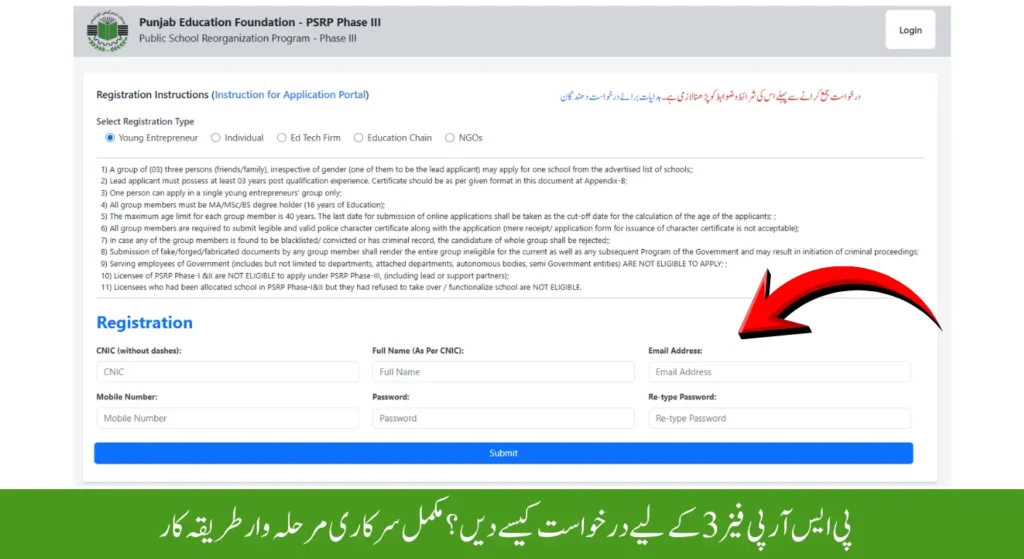
Step 2: Register a New Account
To start the application process, you must first create an account.

Follow these steps:
- Click Register New Account
- Select your application category
- Read the eligibility criteria
- Enter your registration information
Important rules mentioned in the official manual:
| Rule | Explanation |
|---|---|
| One category only | Applicants cannot register in multiple categories |
| Mandatory fields | All registration fields must be completed |
| Accurate information | Incorrect details may lead to rejection |
After successful registration, return to the login page.
Step 3: Login to Your Dashboard
Once registration is complete:
- Enter your username or CNIC
- Enter your password
- Click Sign In
After logging in, you will access your PSRP application dashboard.
The dashboard shows:
- Registration status
- Application status
- Challan status
Step 4: Start the Application Form
From the dashboard:
- Click Final Submit Application
OR
- Select your application category from the side menu.
This will open the application form where you can start filling your details.
Step 5: Enter Lead Applicant Details
The first section requires the lead applicant’s personal information.

Information required includes:
| Required Details |
|---|
| Full name |
| Father / Husband name |
| Postal address |
| District |
| Tehsil |
| CNIC |
| Date of birth |
| Mobile number |
| Email address |
All fields must be completed carefully before saving the form.
Step 6: Add Supporting Applicants (Young Entrepreneur Group)
If applying under the Young Entrepreneur Group category, you must add two supporting applicants.
Important rules:
- Maximum two supporting members
- Total group size = 3 applicants
- Each member’s details must be entered separately
The system displays all members in a table where they can be edited or removed.
Step 7: Add Qualification Details
Applicants must provide their educational qualifications.
Examples of qualifications:
| Qualification Level |
|---|
| Matric |
| Intermediate |
| Graduation |
| Master’s Degree |
| Professional Qualification (B.Ed / M.Ed) |
Applicants must enter:
- Institution name
- Degree type
- Obtained percentage
- Attested documents
These records appear in a table where they can be edited.
Step 8: Add Experience Details
The next step is to add professional experience.
Applicants must enter:
| Experience Information |
|---|
| Employer name |
| Job designation |
| Start date |
| End date |
| Total experience in years |
Experience details can also be updated or removed before submission.
Step 9: Select Schools
After entering personal and qualification details, applicants must choose the school they want to apply for.

Selection requires:
- District
- Tehsil
- School name
These options appear as dropdown menus inside the application portal.
Selecting the right school is important because it affects merit calculation and proximity marks.
Step 10: Save and Preview Application
Once all information is entered:
- Click Save and Preview
- Review the complete application form
- Correct any mistakes
Applicants can edit their application only before final submission.
Step 11: Submit Application
After reviewing the form carefully:
- Click Submit Application
- Confirm your submission
Important note:
Once the application is submitted, it cannot be edited or modified.
Applicants must ensure all details are correct before submission.

Step 12: Print Application Form
After successful submission, applicants can download and print their application.
The system generates a PDF version of the submitted application form.
This document can be used for record keeping.
Step 13: Generate Challan Form
Applicants must generate the challan form using the official link.
After generating the challan:
- Pay the required fee
- Upload or update challan information
- The challan status will appear on the dashboard.
PSRP Phase 3 Application Process Summary
| Step | Action |
|---|---|
| 1 | Open PSRP portal |
| 2 | Register account |
| 3 | Login to dashboard |
| 4 | Start application form |
| 5 | Enter applicant details |
| 6 | Add group members (if required) |
| 7 | Enter qualifications |
| 8 | Add experience |
| 9 | Select schools |
| 10 | Preview application |
| 11 | Submit application |
| 12 | Print application |
| 13 | Generate challan |
Important Tips Before Submitting PSRP Phase 3 Application
To avoid rejection:
- Double-check educational percentages
- Ensure experience certificates are accurate
- Select schools carefully
- Upload correct documents
- Review the application before submission
Taking time to verify your application can significantly improve your chances of success.
Frequently Asked Questions
How do I apply for PSRP Phase 3?
Applicants must register on the PSRP portal, complete the online application form, upload required details, select schools, and submit the application through the official portal.
Can I submit PSRP application by post?
No. According to the official user manual, only online applications are accepted.
Can I edit the PSRP application after submission?
No. Once the application is submitted, it cannot be edited.
Do I need to generate a challan for PSRP Phase 3?
Yes. Applicants must generate the challan form through the official portal and update its status on the dashboard.
Disclaimer
This guide is created for informational purposes based on publicly available PSRP documentation. Applicants should always verify official instructions through Punjab Education Foundation before submitting their applications.

assalamualaikum
I applied for phase 3 but by mistake I entered the CNIC wrong. How I can edit?
Edit option available on your profile
Please confirm the Challan fee and process to deposit the fee
10000 PKR
Have the date been extended to apply for PSRP ?
Not Yet last Date 7th April
How can we assess which school is better to apply?
There is no way to check it online, but you can visit the school and analyze it manually.
VERY WELL DONE AQSA. YOU HAVE REALLY DONE A REMARAKBLE JOB. I REALLY GET KNOWLEDGE THROUGH THIS FOR APPLICATION . PLEASE KEEP IT UP. IN THE MEAN TIME, CAN YOU PLEASE MENTION WHAT OTHER SERVICES YOU ARE OFFERING SO THAT IN CASE WE NEED, WE APPROACH YOU. (You can share your CV through (arifaziz379@yahoo.com) .
Thanks So kind of you Join my WhatsApp Channel for Latest Updates
Hello, could you please clarify how many schools an individual can apply to?
Only 1
Aoa me online apply ker lia hy Chalan bhe pay ker lia hy ab Dacoment office me bhe bhjny hain please guide me
Ni Bs Online e apply krna tha
Whatsapp channel plz
Website per show ho rh ha
Kia phase 3 mn apply krtey waqat affidavite b daina ho ga stamp paper p?
Hanji
How can we upload affidavit and CNIC copies?
Mobile se pic bana k upload krn
Does a person who is applying indvidualy must need the teaching experience?
Yes Required
mam kia stam paper must hy? online to khn ska option nh h
mam kia stamp paper must hy? online to khin iska option nh hy.
mam application py jo signature r date ki space hy usy kesy fill out kia jy?
jinho ny phase 2 main as a support member apply kia tha or school bhi mil gya tha to kia support member phase 3 main as a lead member apply kr skta h?
mam chalan hi upload kerna hy na ya chalan ki reciept?? kindly reply
Apply kr diya tha.
Sab kuch theek huwa .
Ab website per login nahi hobraha.
Abi kya status chal raha hai?
Application approved ho gai ya nahi?
Ye sab details kahan sy check kr sakty hain.?
Jahan submit kiya tha website to login nahi ho rahi.
Wait krn Kuch Din